
Warchest Compliance will flag over-the-limit contributions in the Filing Error tool under Reports. You can click through each flagged Receipt here to make reattributions:
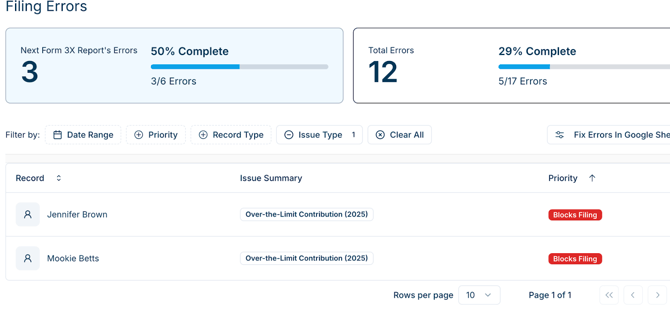
- Click a Receipt to open the flow of Filing Errors. You’ll be able to click through to the next Error, or close.
- Click to select the Contribution to address.
-
- Create Refund will prompt you to create a Refund Disbursement.Choose either Create Refund or Reattribute.
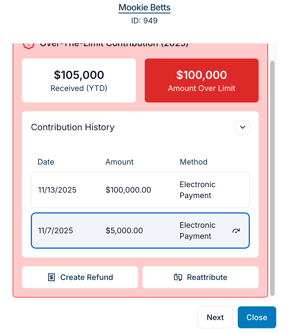
- Create Refund will prompt you to create a Refund Disbursement.Choose either Create Refund or Reattribute.
- Create Refund prompts you to create a Refund Disbursement.
- Reattribute opens a new window with Reattribution options:
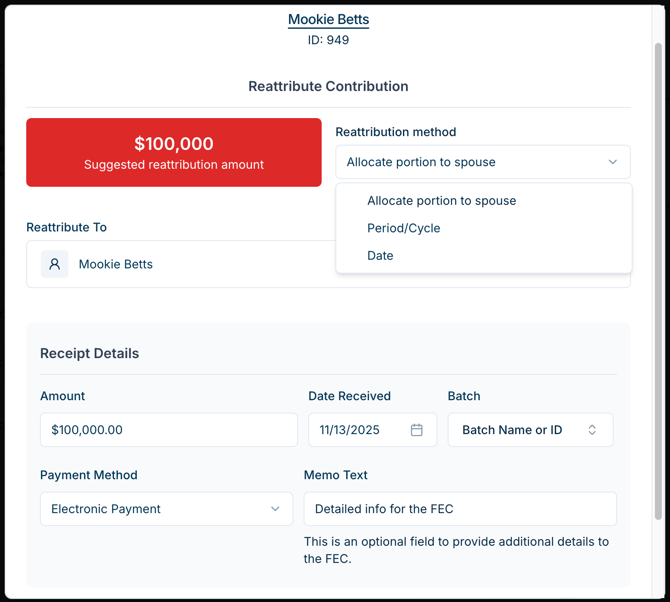
Choose Reattribution Method:
- The Reattribution Method dropdown prompts you to select the scenario for this Reattribution. This will allow the app to create the correct reattributed receipt for the reporting period.
1. Period/Cycle.
Reattribute dollars to a different period and/or cycle.- Select Period/Cycle to reattribute part of the Receipt to the current reporting period.
- Select the Period and Cycle (election year) to reattribute to.
- After you click Create Reattribution, a blue notification bar to let you know the reattribution was successful. You can click it to view the Receipt that was reattributed and make any corrections if needed.
2. Reattribution to Partner.
- Click the donor’s name in the Reattribute To menu to search your account for the partner’s contact. If the partner is not yet in your account as a Contributor, + Create New Individual in this screen.
- After you click Create Reattribution, the transactions will appear in Warchest Compliance and in any relevant Reports.
Example Partner Reattribution Receipts in same Reporting Period:
$1500 donation, $1000 limit. Split into $1000, $500 contributions for married couple Aaron B and Caroline B
This month:
- Aaron B $1500 (not memo)
- Aaron B $ -500 (memo)
- Caroline $1000 (memo)
Example Partner Reattribution Receipts in different Reporting Period:
$1500 donation, $1000 limit. Split into $1000, $500 contributions for married couple Aaron B and Caroline B
Last month:
- Aaron B $1500 (not memo)
This month:
- Aaron B $1,500 (memo)
- Aaron B $ -500 (memo) *Displayed on 3x as child of above amount, memo item
- Caroline $1000 (memo)
3. Date.
Select Date as the Reattribution Method to reattribute dollars from the same donor to a different date.
- Adjust the amount you want to reattribute to a new Receipt. You’ll have the option to provide Memo Text for Form 3x.
- Adjust the Date Received.
- After you click Create Reattribution, the reattributed transactions will appear in Warchest Compliance and in any relevant Reports.