
ActBlue Receipt Refund Ingestions
When ActBlue issues a refund to a donor, it will automatically be reflected in Warchest Compliance after the next ingestion (weekly or end of month). Each individual refund is processed as a disbursement to the original donor for the amount of their corresponding donation.
If a donor requests refunds on multiple donations, each individual donation will have a corresponding disbursement for an amount equal to the original donation.
These refund disbursements are linked to the original receipt in our system and they are visible when you review the disbursement detail page for the refund.
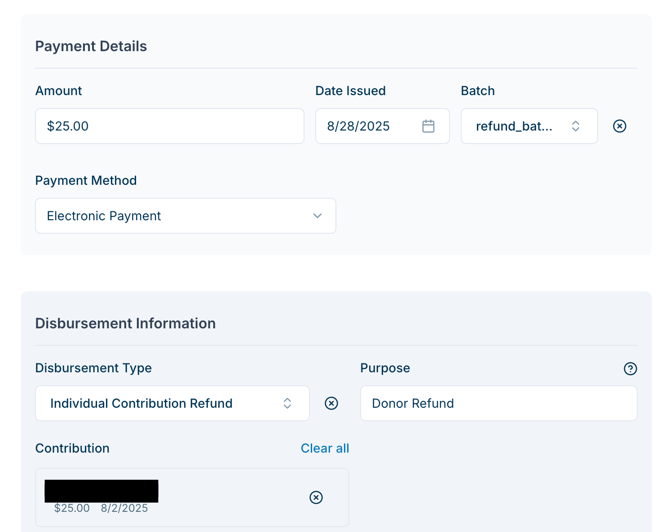
In a typical week, ActBlue processes receipts and refunds early Monday morning. All refunds for the prior week are grouped with the prior week’s transaction fee disbursements on Sunday (or whenever Actblue issued the disbursement to the committee, sometimes on the last day of the month).
This refund tracking process happens automatically between our software and ActBlue, but must be handled manually for all other sources (such as refunding a check that was not processed through ActBlue).
Same-Week Refunds
If a client is refunded by ActBlue before the committee receives a conduit payment from ActBlue, the original receipt is not ingested into Warchest Compliance. (This usually happens when the refund is issued during the same calendar week as the original donation.) The donation and refund will still be visible within ActBlue’s platform, but is not ingested for compliance purposes. Because in this case ActBlue never deposits the contribution in the committee’s bank account, from our system’s perspective, it is as if it never happened.
Transaction Fee Refunds
When we ingest a refund, we account for the corresponding transaction fee that ActBlue owes the committee automatically, but separate from the contribution. Each transaction fee that was associated with the original refund is grouped with that period’s set of corresponding transaction fees.
For example, if a given committee paid ActBlue $10 as a transaction fee for a given week and 2 refunds occurred during that week for a total refunded transaction fee of $0.50, our software automatically creates a corresponding disbursement for the Committee to ActBlue, reflecting both the transaction fees and all refunded transaction fees for that week. Therefore the corresponding Disbursement in this example would become $9.50.
*Note that our database stores each incremental transaction for future auditing or editing, but all transaction fee transactions for that week are shown together on our software and on reports.
Insufficient Funds to Cover Refund
It is possible, especially as a committee winds down, that its refunded transaction fees might exceed the amount of transaction fees being paid out for that week. This case would create a negative disbursement (which represents the money that ActBlue owes the committee). Although this is rare, our system allows for this negative disbursement to be created and simultaneously creates a “Blocks Filing” data validation error to encourage the user to resolve the issue.
Some ways users might resolve this error are:
- Logging a payment from ActBlue to offset the difference
- Changing dates on the underlying transactions so future transaction fees offset the amount ActBlue owes the committee.
- Accepting the negative disbursement and dismissing the error.
If you need help, feel free to reach out to compliance@mywarchest.com.
What if Actblue Issues Multiple Payments in a Given Week?
If multiple ActBlue transfers were made in a given week: refunds and outgoing transaction fees are grouped into a single disbursement for each ActBlue transfer. If ActBlue issues multiple checks (or ACH/wire transfers) in a given week to a given committee, each will have its own refunds and transaction fees disbursement.